Home users and smaller organizations ask regularly what they can use to defend their “endpoints”.
What is an “endpoint”? Simply- it’s your computer, phone, or tablet device.
Now, if your use case contains Windows computers, is the built-in free Windows Defender antivirus protection enough? As in all things, it depends.
In my early days of doing “cyber incident response” we had disconnected machines for analyzing entire hard drives. One of the neat things was when Defender would scan the drive and alert on files. Aha! Something to examine in depth. Note that I said “files” though. Windows Defender that lives on your computer is very good at scanning malicious files and keeping up to date with known “viruses” – when the computer is regularly connected to the internet and when Windows Defender is running. When my forensics machine was update regularly, it did a great job alerting to ransomware files.
What Defender doesn’t do is protect you from things outside of opening malicious files. We could go down a technical rabbit hole for us IT nerds and say it does more, but let’s keep this approachable for the daily user. What happens if you are in your inbox and click on that juicy LinkedIn notification that someone at Microsoft was looking at your profile? If that big shiny button leads to a known dangerous site, Defender isn’t going to protect you.
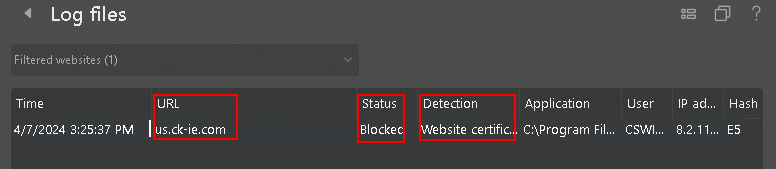
The image below shows the log files for endpoint detection features. Defender does NOT do anything outside of scanning files and preventing you from opening malicious files. It will NOT prevent you from clicking on imposter websites and then entering your credentials into a fake website, nor will it stop suspicious pop ups or malicious downloads.

What will protect you from clicking on malicious links, entering your credentials into imposter sites and other risky behavior? This is where “endpoint protection”, “EDR”, “XDR” come in. Think of Microsoft Defender protecting you from opening a bad FILE. Consider the rest to be more advanced and encompassing things like clicking on suspicious links, going to known risky websites, stopping malicious internet ads from creating files on your machine and popping up notifications that your “computer is infected with a virus.”
Another thing Defender won’t stop you from doing is clicking on and loading malicious websites. The screenshot below shows a user’s attempt to visit a suspicious site. The site was blocked from loading.
If your organization is high risk, it’s best to consider something above and beyond Microsoft Defender. How much will this cost you? Some vendors will sell licenses for their product at around $11/machine. I understand budgets are tight, but the cost of staff overtime, legal consultations and remediation will be far more than $11/machine. Though it’s tempting to use free versions of commercial products, your team will be best served with a product that handles threats based on behaviors instead of a list of known bad items and a central console that your IT provider can sign into to manage and view alerts.
 Campaign and public sector information security
Leave a comment